
What Is a TV Cabinet Wall Unit?

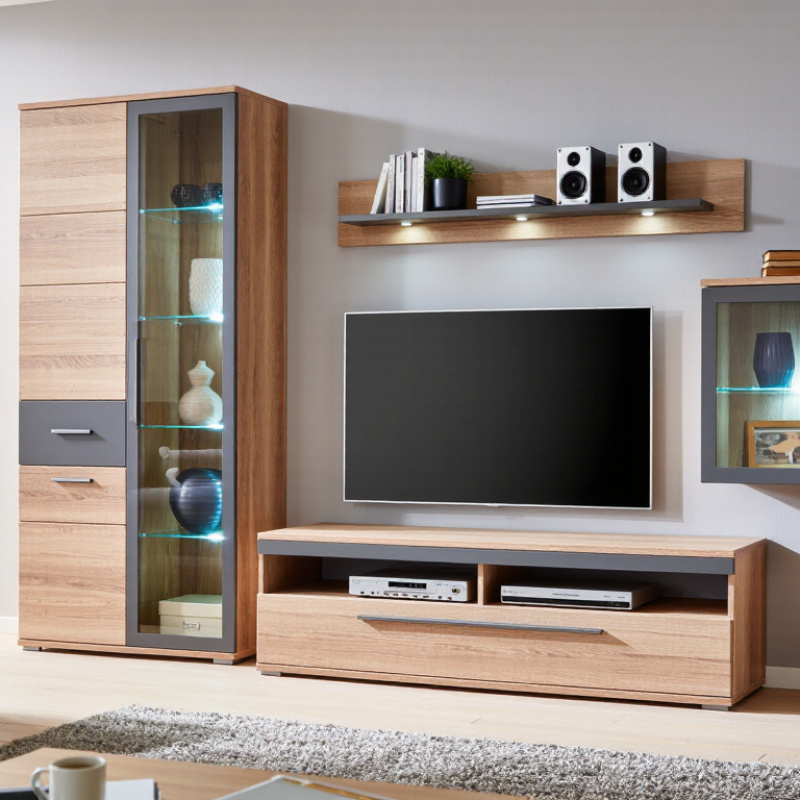
A Tv Cabinet Wall Unit combines a television area with storage and display space in one coordinated installation. It may include a media console, open shelves, closed cabinets, and wall-mounted panels. Some designs also leave room for books, speakers, or a few personal objects. The exact layout varies. Not every unit includes every feature.

In practical terms, the unit helps organize a living room around the screen. A console can conceal game systems and cables, while shelves keep everyday items within reach. Before choosing one, measure the wall, television, and available floor space. Check where power outlets sit, too. These details can affect both installation and daily use. A wide cabinet may look balanced beneath a large screen, but it can overwhelm a narrow room. Small oversight, big effect.

Materials and construction also matter. Solid wood, engineered wood, metal, and glass each offer different appearances and care requirements. Ask how shelves are supported and whether the cabinet provides ventilation for electronics. Heat needs somewhere to go. If the unit will be mounted to a wall, confirm that its weight and fixing method suit the wall structure; a qualified installer can help assess this. Style is only part of the decision. A useful Tv Cabinet Wall Unit should fit the room, support the equipment safely, and make storage easier. It may still require compromises, especially when the wall has uneven surfaces or limited space. Measuring carefully—and being honest about what you actually need—makes the choice more reliable.
What Is a TV Cabinet Wall Unit?

Definition and Role: How a TV Cabinet Wall Unit Combines Storage and Display

What Is a TV Cabinet Wall Unit?

Definition and Role: How a TV Cabinet Wall Unit Combines Storage and Display

A TV cabinet wall unit is a fitted furniture arrangement built around the television. It usually combines a lower cabinet, open shelving, wall panels, and enclosed compartments. Unlike a simple TV stand, it uses vertical wall space for both storage and display. The structure can hold media equipment, books, speakers, framed photographs, and everyday items.

Its main role is practical organization. The lower cabinet hides cables, game controllers, remote controls, and unused devices. Open shelves keep decorative objects visible without making the room feel completely closed. Wall-mounted sections can also create a visual frame around the screen. This helps the television sit naturally within the interior instead of appearing as an isolated black rectangle.

In real homes, careful planning matters. Measure the screen, wall width, viewing height, and power outlet positions before installation. Leave ventilation around electronic equipment, especially inside enclosed compartments. Sliding doors may reduce dust, but they can restrict airflow. I have seen attractive units become inconvenient because their shelves were too shallow for equipment. That mistake is easy to make. Adjustable shelving and hidden cable channels improve daily use. Still, a wall unit is not automatically better than a basic cabinet. It can feel heavy in a small room, and excessive open storage may create visual clutter. A balanced design should display a few meaningful objects while keeping practical items concealed.

What Is a TV Cabinet Wall Unit?

A TV cabinet wall unit combines a central TV space with closed storage and open display shelves. This example shows how a 240 cm-wide unit could divide its horizontal space.

Example layout, not a universal standard: the TV area accommodates the screen, closed cabinets conceal items, and open shelves display books or decorative objects. Measure your room and equipment before choosing dimensions.

Main Components: Cabinetry, Shelves, Cable Routes, and VESA-Compatible Mounts

A TV cabinet wall unit combines storage, display space, and a secure mounting area. Lower cabinetry can hide consoles and accessories, while open shelves keep frequently used devices reachable. Measure the screen, sound equipment, and cabinet depth before choosing shelf spacing. A few centimeters can decide whether a device fits or blocks ventilation. The finish matters, but airflow matters more.

Cable routes should connect the screen, power outlet, and equipment without tight bends or dangling loops. Use separate paths or suitable dividers for power and signal cables, and leave slack for servicing. For the mount, check the TV’s VESA hole pattern, screen weight, and the mount’s rated capacity.

Nielsen’s 2024–25 National TV Household Universe Estimates count 125.4 million U.S. TV households, reflecting how common television setups remain. That figure does not determine a room’s needs, though. Even a careful layout can overlook a plug that sticks out from the wall.

Tips: Mark the screen outline and cable exit points with painter’s tape before installation. Test shelf access with actual devices. Keep ventilation gaps clear, and confirm that the wall structure can support the mounted load. A neat plan can still need revision.

Planning the Layout: Apply SMPTE’s 30° Reference Viewing Angle

What Is a TV Cabinet Wall Unit?

Planning the Layout: Apply SMPTE’s 30° Reference Viewing Angle

A TV cabinet wall unit should support comfortable viewing, not only hide cables. SMPTE guidance commonly uses a 30° horizontal viewing angle as a reference for high-definition displays. This means the screen should fill roughly 30° of your visual field from the main seat. Measure from the viewer’s eye position, not the cabinet edge. For example, a 65-inch 16:9 screen is about 57 inches wide. A 30° angle places the primary viewer approximately 8.5 feet away. The calculation is useful, but real rooms are rarely perfect.

The cabinet depth also matters. A seating distance that works for the screen may leave too little walking space. The International Telecommunication Union’s BT.500 recommendation stresses controlled viewing conditions, including stable lighting and consistent observer position. In a living room, bright windows and glossy cabinet doors can weaken perceived contrast. Keep the screen away from direct daylight when possible. Mount the center of the display near seated eye level. A wall unit that is too high may cause neck strain, even when the viewing angle looks acceptable.

Sources: SMPTE viewing guidance; ITU-R BT.500, Methodology for the Subjective Assessment of the Quality of Television Pictures.

Sizing and Fit: Match Cabinet Width to TV Dimensions and Room Scale

A TV cabinet wall unit should frame the screen without making it look squeezed or lost. Measure the TV’s actual width, not just its diagonal. A typical 65-inch, 16:9 screen is about 57 inches wide; a cabinet around 61–69 inches wide leaves roughly 2–6 inches on each side. Check the product’s listed dimensions, since bezels and stands vary. Small detail. A few inches matter.

Room scale matters too. In a narrow room, a deep cabinet can crowd the walkway, even when its width fits. SMPTE technical guidance commonly uses a 30-degree horizontal viewing angle as a benchmark for HDTV viewing. Use it as a check, not a rigid rule: seating distance and personal preference change the experience. For example, a 65-inch screen viewed from about 8 feet gives an angle near 30 degrees. Allow extra width if speakers or decor sit beside the TV, and check wall studs and cable routes before choosing a wall unit. This sizing rule is imperfect; I’d still tape the cabinet outline on the wall and live with it for a day. A paper outline can reveal a cramped corner you missed on a screen.

Safety and Installation: Check Wall Anchors, Load Ratings, and Cable Access

What Is a TV Cabinet Wall Unit?

A TV cabinet wall unit combines a television shelf, enclosed storage, and wall-mounted cabinetry. Its clean appearance can hide serious installation risks. The U.S. Consumer Product Safety Commission reported 71,300 emergency-department injuries from furniture tip-overs between 2018 and 2020. Children represented a significant share of these incidents. A wall unit should never rely on appearance alone.

Check the wall structure before drilling. A stud, masonry anchor, or properly rated fixing system must match the cabinet’s loaded weight. Include the television, shelves, books, consoles, and decorative objects. Do not trust drywall anchors for heavy cabinets unless their tested rating supports the complete assembly. BIFMA stability standards emphasize testing loaded storage furniture, but actual site conditions still matter. Walls vary. That part is easy to underestimate.

Use a level, then verify every anchor’s engagement. Tighten gradually, because overtightening can crush board materials or damage plaster. Leave a clear cable route behind the television and cabinet. Cables should avoid sharp edges, heat sources, and tightly closed openings. Provide ventilation around power equipment, with space for inspection and replacement. The National Electrical Code also requires accessible electrical connections and safe routing practices. I have seen neat installations fail because cables were trapped after final mounting. Measure cable lengths before fixing the unit. A small service gap may look imperfect, but it can prevent a costly rebuild.

What Is a TV Cabinet Wall Unit? - Safety and Installation: Check Wall Anchors, Load Ratings, and Cable Access

Safety Check What to Verify Installation Guidance Ready-to-Install Indicator
Wall construction Identify whether the fixing points are solid timber studs, masonry, or hollow drywall. Do not assume a wall is solid based on its surface. Use fixings specified for the wall material and the unit. If wall construction is unclear, confirm it before drilling. The wall type is known and the chosen fixing method is compatible with it.
Wall anchors and fasteners Check the installation instructions for the required fastener type, size, number, and locations. Inspect supplied hardware for damage. Fasten into structural framing or suitable masonry where the instructions require it. A drywall anchor is not a substitute for a stud connection unless the unit instructions specifically permit that anchor and installation. Every required fixing point is secured with the specified hardware in an appropriate part of the wall.
Load ratings Review the rated capacity for the cabinet, shelves, TV mount, and any wall-hung components separately. Include the weight of the TV and stored items when checking capacity. Do not exceed the lowest applicable rating, and do not treat a fastener’s rating as the capacity of the complete installed unit. The planned TV and contents are within the manufacturer’s stated limits for each component.
TV mount attachment Check that the mount is compatible with the TV and is attached to the wall or cabinet exactly as specified by the mount and unit instructions. Use the specified mounting pattern and fasteners. Do not attach a TV mount to a decorative panel unless that panel is designed and rated to support it. The mounting surface and hardware are approved for the TV and mount combination.
Cabinet stability and leveling Confirm that the unit is level, assembled correctly, and fitted with any required anti-tip or wall-restraint hardware. Follow the assembly sequence and secure the unit before loading it. Keep heavy items low and distribute stored contents evenly. The unit is stable, level, and restrained as directed by its instructions.
Cable access and ventilation Locate cable openings and check that they allow the TV, power, and signal cables to pass without pinching or sharp bends. Keep ventilation openings clear and follow the equipment manufacturers’ clearance guidance. Do not route cables where doors, drawers, or moving parts can crush them. Cables have a clear route, and ventilation openings remain unobstructed.
Electrical and concealed services Check for electrical wiring, plumbing, or other services in the proposed drilling area. Use an appropriate detector and follow its instructions before drilling. If a service may be present, stop and obtain qualified help. The drilling locations have been checked and are clear of known concealed services.
Final inspection Inspect the fixings, cabinet joints, doors, shelves, and cable routes after installation. Test the unit gently before placing the TV or other heavy items. Recheck fasteners periodically and after moving or servicing the unit. No movement, loose fixings, damaged parts, or trapped cables are found.

Important: Installation requirements and load limits vary by product and wall construction. Follow the unit, TV mount, and fastener manufacturers’ instructions; consult a qualified installer if the wall or fixing method is uncertain.

Before you go

Leave your projects details, and one of our team will reach out to answer any questions you may have