
10 Best Smart Parking Systems for Businesses?

Choosing a Smart Parking System is not just a technology purchase. It changes how drivers find spaces, how staff manage demand, and how operators understand daily use. A sensor can report that a bay is occupied; a clear sign can help a driver reach an available space without circling a crowded garage. Small details matter.

Parking scholar Donald Shoup famously wrote, “Minimum parking requirements are a fertility drug for cars.” His observation is a useful reminder: adding spaces alone may not solve a parking problem. Better information and thoughtful management can matter, too. But software is not a cure-all. A confusing app or unreliable sensor can frustrate drivers faster than an old-fashioned sign.

This guide introduces 10 smart parking systems for businesses, from offices and hotels to retail sites and mixed-use properties. It considers practical features such as space detection, reservation tools, payment options, license-plate recognition, reporting, and integration with existing access systems. It also highlights questions worth asking vendors: How well does the system handle peak arrivals? What happens when connectivity drops? Can staff correct inaccurate occupancy data?

There is no perfect fit for every property. A compact employee lot may need different tools than a busy public garage. That distinction is easy to overlook. The aim is to help business owners compare capabilities, costs, and operational trade-offs before choosing a solution.
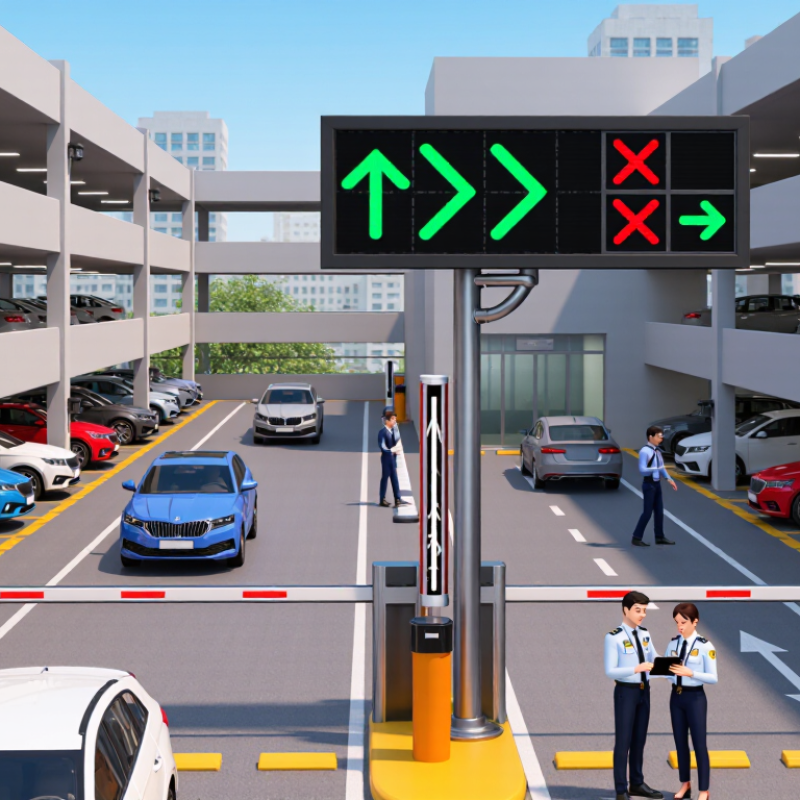
10 Best Smart Parking Systems for Businesses?

How Smart Parking Systems Work

Smart parking systems combine space sensors, cameras, entry counters, and management software to show which stalls are available. A sensor may detect a vehicle through changes in distance or magnetic readings. Cameras can monitor several spaces at once, though lighting, weather, and blocked views may affect results. The system sends occupancy data to a dashboard, signs, or a parking app. Staff can then spot busy areas and adjust operations using current information.

Tips: Test sensors during busy and quiet periods. Compare live space counts with a manual check. Keep signs easy to read near entrances, where drivers need quick guidance.

The system works best when its parts communicate reliably. For example, an entry counter can track vehicles entering, while stall sensors confirm individual space use. If the numbers disagree, staff should investigate rather than assume either source is correct. Data may arrive late when a network connection drops. That is a real weak spot. Regular maintenance, clear staff procedures, and sensible privacy safeguards help keep the system useful. Businesses should also review reports over time; a few weeks of occupancy patterns can reveal when demand peaks and whether reserved spaces are being used as intended.

Key Features for Business Parking Operations

A useful business parking system does more than show open spaces.

It helps staff manage peak arrivals, visitor access, and payment exceptions without adding another manual task. Live occupancy data can come from bay sensors, entry cameras, or gate counts; each method has different maintenance needs. A dashboard should show capacity by zone and flag stale readings, not just display a reassuring green map. Small details matter. A receptionist may need to register a guest quickly, while facilities staff need reports on turnover and long-stay vehicles.

For daily operations, look for reliable access control, clear user permissions, and integrations with existing building or payment workflows. Alerts for full lots, equipment faults, and unusual queue buildup can help teams respond before the entrance backs up.

Check how the system behaves during a network outage. Gates may need a safe manual process, and staff should know what data will sync later. Privacy settings and retention controls deserve equal attention, especially where cameras are used.

Test the edges. A short pilot during a busy week can reveal confusing signs or missed readings. It may also expose workflows that look smooth in a demo but frustrate visitors. No system removes every exception, and that is worth admitting.

Criteria for Comparing Smart Parking Solutions

Compare smart parking systems by accuracy, coverage, integration, and operating cost—not by dashboard polish.

INRIX Research’s 2017 Parking Pain report estimated that U.S. drivers spent an average of 17 hours yearly searching for parking, costing each driver about $345.

That estimate is a useful benchmark, not a promise that sensors will recover the same value at your site. Still, averages can mislead.

Test detection accuracy in real conditions: a crowded entrance, a rainy evening, and spaces beside concrete pillars. Ask how the system handles outages, stale occupancy data, and different vehicle types. Check whether it connects with existing access controls and payment tools, and whether staff can export usable reports without specialist help.

Compare full costs, including installation, connectivity, maintenance, and support. A small pilot can expose gaps before a full rollout. It should measure occupied-space accuracy and the time needed to resolve faults.

Also review data retention and user permissions; these details are easy to overlook. A cheaper system may create expensive blind spots.

(INRIX Research, Parking Pain, 2017)

Ten Smart Parking Systems for Businesses

Ten smart parking systems can help businesses manage spaces with less guesswork. Sensor-based systems detect whether each bay is occupied. Camera-based systems monitor rows and entrances. License-plate recognition can support smooth entry, while reservation systems let visitors book spaces before arrival. Parking guidance displays show drivers where spaces are available. Mobile payment systems reduce queues at pay stations. Access-control systems manage staff and visitor entry. EV charging management tracks charger use and availability. Occupancy analytics reveal busy periods. An integrated platform can connect these tools, though setup quality matters more than a long feature list.

Tips: Walk the site before choosing a system. Note blind corners, dim areas, and the distance between entrances and parking rows. Test how quickly occupancy updates after a vehicle leaves. Ask how the system handles network outages and what data it stores. Keep signs readable from a moving car. Small details matter.

Match the system to your daily traffic. A clinic may need dependable visitor reservations, while an office may value staff access and occupancy reports. Check whether existing gates and payment processes can connect to the new setup. Pilot a few spaces before expanding. It may feel slower at first. Staff also need clear instructions, and drivers may ignore confusing prompts. Review usage after several weeks; real patterns can differ from planning estimates.

10 Smart Parking System Categories for Businesses

A functional comparison of common system types—not a vendor ranking. A value of 1 indicates a typical core function; actual features depend on the specific installation.

Occupancy sensing detects whether spaces are in use. Access and payment functions manage entry or transactions, while guidance helps drivers locate available parking. Businesses often combine multiple system types.

Planning and Implementing a Smart Parking System

Planning a smart parking system starts with a site audit, not a sensor purchase. Count spaces, measure peak-hour occupancy, and note where queues form. A peer-reviewed 2006 field study in Transport Policy found that cruising for parking made up about 30% of traffic on some sampled Los Angeles blocks. That result is not a universal benchmark; it shows why each business should collect its own baseline. Walk the site at opening, lunch, and closing. Record accessible spaces, visitor turnover, and dead zones where signals may fail.

Then define what the system must improve: shorter search times, reliable space counts, or simpler payment and access. Match sensors or camera-based detection to lighting, weather, layout, and maintenance capacity. Test a small zone first. Compare system counts with manual checks for several weeks, and set a clear accuracy threshold before expanding. Be candid about weak spots. A dashboard can look precise while missing cars beneath trees or in covered bays. Train staff to handle outages, explain data use to drivers, and review performance monthly. Keep a fallback process; even a thoughtful rollout will need adjustments.

Before you go

Leave your projects details, and one of our team will reach out to answer any questions you may have